



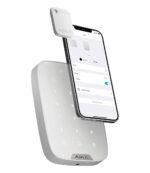


Ajax Tag: operate your alarm without a code or app
A contactless key fob with which you arm and disarm the Ajax system. Hold the Tag up to the control device for a moment and you are done, without entering a code or opening the app. This set contains three Tags.
The Tag uses DESFire technology: the same secure, copy-protected standard that is also used in public transport. Give each family member or employee their own Tag and manage the permissions centrally in the Ajax app. The Tag works with the KeyPad Plus, the KeyPad TouchScreen and the KeyPad Outdoor.
Why the Ajax Tag
Contactless operation
Hold the Tag up to the control device and the system arms or disarms, without a code or app.
Secure DESFire technology
Encrypted and copy-protected, based on the international standard ISO 14443.
Per user
Give everyone their own Tag and manage the permissions centrally in the Ajax app.
For the contactless KeyPads
Works with the KeyPad Plus, the KeyPad TouchScreen and the KeyPad Outdoor.
The Ajax Tag in pictures
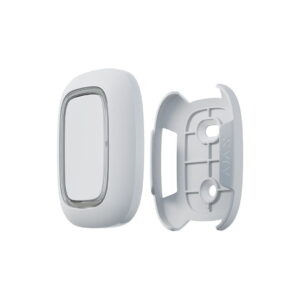
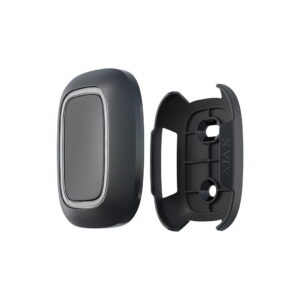
The key fob in white and black. See below what the Tag looks like.


Technical specifications
| General | |
| Type | Contactless key fob (RFID) |
| Quantity | 3 pieces |
| Technology | DESFire, ISO 14443 |
| Security | Triple DES and AES with 128-bit key, copy-protected |
| Compatibility | KeyPad Plus, KeyPad TouchScreen and KeyPad Outdoor |
| Housing | |
| Dimensions | 45 x 32 x 6 mm |
| Colours | White or black |
Frequently asked questions about the Ajax Tag
Which control devices does the Tag work with?
On the KeyPad Plus, the KeyPad TouchScreen and the KeyPad Outdoor. The standard KeyPad has no contactless reader and works with codes only.
What is the difference from the Pass?
The technology and security are the same. The Tag is a key fob, the Pass is a credit-card-sized card. Choose whichever you prefer to carry.
How many Tags are in the set?
Three. This lets you give several family members or employees their own Tag straight away.










Brian (verified owner) –
Great, works well.
JCK (verified owner) –
Works well
Paul Poels (verified owner) –
In combination with the keypad, the response is mediocre. Sometimes three to four attempts are needed to get a response.
Secures –
We checked remotely and explained that an error message was active, which made arming impossible. Because the Keypad Plus has no display, you need to check the app for the message. The keypad therefore did not respond badly; the error message blocked the action.
Peter-Jan van Broekhuizen (verified owner) –
Works well, easy installation.