
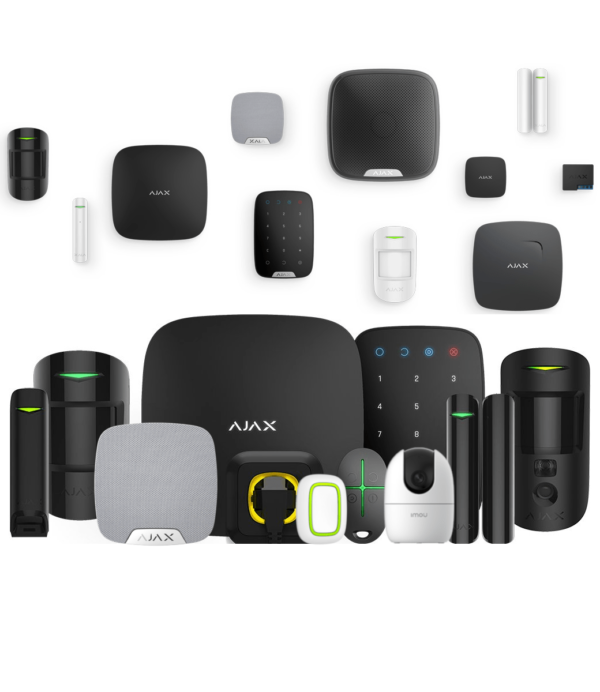


Build your own Ajax alarm system
Use the configurator above to build your own wireless Ajax alarm system with Grade 2 certified components. You see the total price straight away and put together exactly what suits your home or business.
Ajax combines security, design and ease of use. All components are available in white or black, and you pair the entire system through a single app: the Ajax Security System app. Detectors instantly recognise doors being opened, glass breaking, fire and the presence of intruders. Unsure about the right setup? Our customer service will gladly help you decide.
Multi-award-winning wireless system
Ajax Systems is the fastest growing brand in burglary and fire detection. The formula for its success lies in four things.
Grade 2 certified
All components are EN 50131 Grade 2 certified, the standard required for professional applications and by many insurers.
Wireless via Jeweller
The proprietary Jeweller protocol covers up to 2000 metres in open terrain and allows batteries to last up to 7 years.
When Security is Art
Sleek design in high-gloss white or black that blends discreetly into any interior.
Fully via the app
Learn, configure and operate your system from your smartphone, and manage your cameras from the same app.
The end of wired alarm systems
Thanks to the Jeweller protocol, the Ajax system works quickly and reliably. Two-way communication with a ping every 12 seconds means you know immediately if something is wrong. The connections are heavily encrypted and the system alerts you straight away in the event of tampering, jamming or a fault. The hub continuously monitors signal strength and installs software updates automatically, so you do not need to keep an eye on this yourself.
No digging or demolition work: you install a wireless Ajax system without cabling, neatly in an existing home as well.
What should you look for in an alarm system?
A good system fits your situation. Go through these questions before you put your system together.
Which entry points will you secure?
Secure all entry points, especially doors and windows. Magnetic contacts report whether a door or window is open or closed. If you also want tilt and vibration detection, choose the DoorProtect Plus. In addition, secure rooms with indoor or outdoor motion detection.
How do you want to operate it?
With the Ajax Security System app on your smartphone, with a KeyPad code keypad or with the SpaceControl remote control. You can combine them as you wish.
Who responds to an alarm?
We recommend an alarm receiving centre subscription: trained staff who call in the emergency services. It is optional, and you can also set up your own contacts.
Which types of security?
Combine burglary, fire, water and glass break detection with motion detection and sirens. In the configurator you choose exactly what you need.
Loud or silent alarm?
A loud alarm with a siren and flash deters intruders. A silent alarm warns without a physical deterrent, which is useful in specific situations.
Install it yourself or have it installed?
You can easily install Ajax yourself via the app. Prefer to have it installed professionally? See Having an Ajax alarm installed.
What does an Ajax system cost?
You start with a central hub from € 159,95€ 132,19. A magnetic contact for a door or window costs € 34,95€ 28,88. From there you expand your system with exactly the detection and control you need. The configurator above calculates your total price immediately, with no mandatory subscription.
Which Ajax hub suits you?
The hub is the heart of your system. The difference comes down to four things: the connection (Ethernet, Wi-Fi, 2G or 4G), photo verification with MotionCam, the capacity and the system type (wireless only or hybrid with cabling).
| Model | Connection | Wi-Fi | MotionCam | System type | Suitable for |
|---|---|---|---|---|---|
| Hub (2G) | Ethernet + 2G (1 SIM) | No | No | Wireless | Entry level, small system without photo verification |
| Hub (4G) | Ethernet + 2G/3G/4G (1 SIM) | No | No | Wireless | Small system with strong mobile back-up (LTE) |
| Hub 2 (2G) | Ethernet + 2G (2 SIM) | No | Yes | Wireless | Medium-sized, with photo verification |
| Hub 2 (4G) | Ethernet + 2G/3G/4G (2 SIM) | No | Yes | Wireless | Medium-sized, photo verification plus LTE back-up |
| Hub 2 Plus (4G) | Ethernet + Wi-Fi + 4G (2 SIM) | Yes | Yes | Wireless | Large or complex, maximum redundancy |
| Hub BP (4G) | 4G only, no network cable (2 SIM) | No | Yes | Wireless | Locations without mains power or cabling, runs on battery |
| Hub Hybrid (4G) | Ethernet + 4G (2 SIM) | No | Yes | Hybrid (wired + wireless) | Professional, (partly) wired Fibra systems |
MotionCam stands for photo verification: when an alarm is triggered, the system sends photos along, so that you can see immediately whether something is really wrong. Only the Hub 2 models and newer support this.
The right hub for each situation
Small house or apartment
Without photo verification, the Hub (4G) is the most economical choice, with a strong mobile back-up via LTE.
You want photos when an alarm is triggered
From the Hub 2 (4G) onwards you get photo verification with MotionCam. The logical choice for most homes.
Large or complex premises
The Hub 2 Plus (4G) adds Wi-Fi as an extra channel, in addition to Ethernet and two SIM cards. Maximum redundancy.
No mains power or cabling
The Hub BP (4G) runs entirely on a battery and communicates via 4G. Ideal for temporary or remote locations.
Wired system (Fibra)
The Hub Hybrid (4G) combines wired Ajax Fibra with wireless Jeweller, for professional or partly wired installations.
Tight budget, small and wireless
The Hub (2G) is the affordable entry-level option without photo verification. Over Ethernet it remains fully functional; only the mobile backup runs over 2G.
Compatibility differs per hub. View the Ajax compatibility list (PDF) for the supported devices per hub type. Tip: check in the Ajax app under System info whether your OS Malevich version is up to date.
Never alone when an alarm is triggered
Connect your Ajax system to a professional alarm receiving centre. When an alert comes in, trained staff take action immediately, day and night.
What is it?
An alarm receiving centre that receives your alerts 24/7. Trained staff assess the alarm and call the emergency services in the event of a genuine emergency.
How does it work?
Your system forwards alarm notifications to the alarm receiving centre. You can easily register via Secures, after which the alarm receiving centre follows up according to protocols agreed in advance.
Why?
You are never on your own. Even if you cannot respond yourself, there is follow-up. This gives peace of mind and may help with your insurer's requirements.
Signing up for the first time? The first 6 months are free with an annual subscription, which means 50% off in the first year. More info and sign-up.
Free Ajax software
Operate and manage your system on any device, without a subscription.
Ajax Security System
The free app for your smartphone: operate your system on the move, receive notifications and alarms immediately and view live footage from your cameras.
Ajax Desktop
Manage your entire system from your computer: view all your cameras in one customisable video wall, receive real-time notifications and arm or disarm with a single click.
Ajax TV
View the footage from your security cameras on an Android TV screen and keep continuous watch over your home or business on the big screen.
Ajax Media Player
Play videos that you have saved from your Ajax cameras and use a digital signature to check that the footage has not been tampered with.
Frequently asked questions
What is an Ajax alarm system?
Ajax is a wireless security system with Grade 2 certified components that you enrol, configure and operate through a smartphone app. It is available in white or black and detects, among other things, doors opening, fire, glass breakage and intruders.
Is Ajax Grade 2 certified?
Yes, all components are EN 50131 Grade 2 certified. Operation and configuration take place through apps, for both the user and the installer.
How does the wireless connection work and is it secure?
Ajax uses the Jeweller protocol. Detectors communicate in both directions, with a ping every 12 seconds, and immediately report tampering, jamming or faults. The signal is analysed continuously to monitor its strength and quality.
Which entrances do I need to protect?
Secure all entry points, such as doors and windows. With magnetic contacts you can check whether windows and doors are open or closed. Choose the Ajax DoorProtect Plus if you also want tilt and vibration detection.
How can I operate the Ajax system?
Via the Ajax Security System app on your smartphone, via a KeyPad code keypad or via the SpaceControl remote control. You can combine these options as you wish.
What is the minimum cost of an Ajax alarm system?
The central hub starts from € 159,95€ 132,19 and a magnetic contact costs € 34,95€ 28,88. With the configurator on this page, you can extend the system with the security you need.
Is Ajax Systems suitable for homes and business premises?
Yes, Ajax is suitable for both private homes and business environments such as shops, offices and commercial premises. The system is scalable and easy to expand with additional detectors, sirens and control panels.
Does an Ajax alarm system work without internet?
Yes, besides the internet, the Ajax hub can also work via mobile communication with a SIM card. If the internet fails, the system continues to function via the mobile network, depending on the configuration.
How secure is the Ajax Jeweller protocol?
Jeweller uses encrypted two-way communication and detects jamming and tampering, among other things. The hub continuously monitors the connections with the detectors and reports faults immediately.
Can I install Ajax myself or is an installer needed?
Ajax is designed for simple self-installation via the Ajax app. For more complex situations or a connection to an alarm receiving centre, installation by a certified installer may be advisable. We can also install your system for you.
How long do the batteries of Ajax detectors last?
Depending on the type of detector and how it is used, batteries last 5 to 7 years on average. The app sends a timely notification when replacement is needed.
Can the Ajax system be combined with camera surveillance?
Yes, Ajax supports integrations with various IP cameras and NVR systems. You view camera footage in the Ajax app, alongside notifications from detectors and alarm events.
Can an Ajax system be connected to an alarm receiving centre?
Yes, Ajax can be connected to professional alarm receiving centres. When an alarm is raised, the alarm receiving centre follows up according to protocols set in advance. The first 6 months are free with an annual subscription. More info and sign-up.
Does Ajax comply with European security standards?
Ajax meets European security standards and is certified to EN 50131 Grade 2. This is relevant for professional applications and may help with insurance acceptance, depending on your policy conditions.











Maurice Lammers (verified owner) –
Works great!
Brian (verified owner) –
Complete set and easy to install.
Jeroen (verified owner) –
Works plug and play
Raymond L (verified owner) –
Professional system in a modern design.
Arjan Bolleman (verified owner) –
User-friendly and reliable
JCK (verified owner) –
Good system
Rose Koenen (verified owner) –
We are very pleased with our new installation, and we can leave home with peace of mind.
Arno (verified owner) –
easy to put together, we will expand it later after the works
Peter Buschgens (verified owner) –
Very good, I just did not use it this time.