
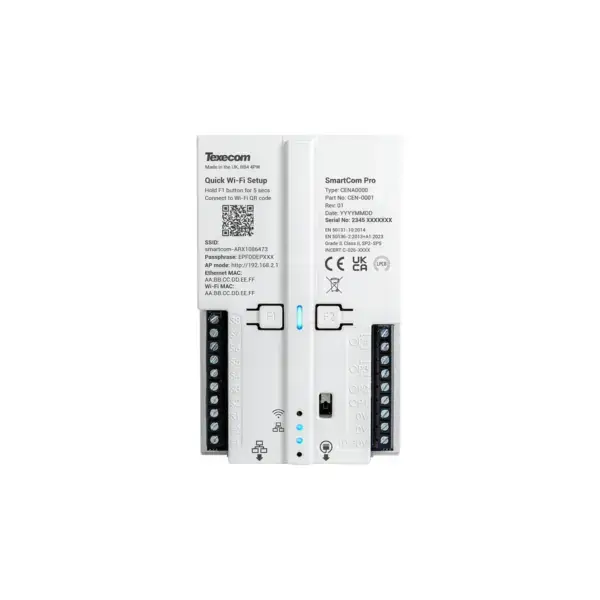

Texecom SmartCom Pro: signalling via the internet, whichever panel you have
The SmartCom Pro is a communicator that links your existing alarm panel to the alarm receiving centre via the network in the building. Wired with a network cable or wireless over wifi, both are included. The panel does not have to be a Texecom: ten inputs read the digital outputs of almost any control panel.
This is the single-path version: all signals go over the IP path, which is polled continuously so that a failure becomes visible within the agreed time. If you want a second, independent route to the alarm receiving centre, look at the SmartCom Pro 4G or the SmartCom Pro DR.
What the SmartCom Pro does
Wired or over wifi
Connect it to the network with a cable, or let it join wifi 802.11 b/g/n on 2.4 GHz with WPA or WPA2. You set up the wifi via a QR code that opens AP mode. Texecom recommends the network cable where one is available, because from category DP2 it is the more reliable choice.
Continuously polled IP path
The path to the alarm receiving centre is monitored continuously, not only when an alarm occurs. If the connection is lost, the alarm receiving centre knows.
Heavily encrypted
Alarm messages and polling travel over the line with AES 256 encryption, with protection against the communicator being replaced by another device.
Ten inputs, four outputs
Ten standardised inputs with a tamper-protected loop, and four outputs (two open collector, two relay) to which you assign a function yourself.
Remote checking
Via Texecom Cloud you carry out status checks, change settings, locate faults and update the firmware. Without having to attend site.
Configuration via templates
Signal configuration is done through PINS templates in Texecom Cloud. This saves time and removes most typing errors from the set-up work.
From 10 to 30 volts
Nominal 12 or 24 volts direct current, with an operating range of 10 to 30 volts. Typically 95 mA at 12 volts, peak 150 mA.
Which panels it works with
Any panel with digital outputs
The ten standardised inputs read the outputs of your existing control panel. This makes the make of the panel irrelevant: if it has a digital output, you can report it.
Full access on Premier Elite
On a Texecom Premier Elite the connection runs serially. Texecom Connect, Texecom Cloud and remote configuration (UDL) then become available as well.
Fire panels too
The inputs and outputs operate on 10 to 30 volts DC, so the communicator suits a fire alarm panel just as well as an intruder alarm control panel. No additional interface module required.
Technical specifications
| Signalling | |
| Paths | Single path: IP over the customer's network or broadband connection |
| Transmission category | SP2 to SP5 |
| Wi-Fi | 802.11 b/g/n, 2.4 GHz, WPA and WPA2 |
| Encryption | AES 256, with anti-substitution protection |
| Alarm receiving centre | All major alarm control panels via Texecom Monitor |
| Connections to your panel | |
| Inputs | 10 standardised parallel inputs: S1 to S8 for security, F1 and F2 as supervised fire input (10K/4K7, up to 30 V) |
| Tamper | EOL-protected loop that reports a disconnected cable as a fault |
| Outputs | 4 units: OP1 and OP2 open collector (30 mA at 30 V), OP3 and OP4 potential-free relay contact |
| Outputs configurable as | Set/unset via key switch, ATP fault, ATS fault, communicator tamper |
| Connection to the panel | Texecom Premier Elite via Texecom's own protocol, other control panels via the standardised parallel inputs |
| Remote configuration (UDL) | Texecom Premier Elite 48, 88, 168 and 640 |
| Management via Texecom Cloud | |
| Remote | Status check, configuration and fault diagnosis |
| Firmware | Update via Texecom Cloud |
| Connection | Annual connectivity and service billing via Texecom Cloud |
| Installation | 4-step LED indication, automatic connection to Texecom Cloud, local Wi-Fi AP mode |
| General | |
| Operating temperature | 0 to 40 °C |
| Humidity | 0 to 95% relative, non-condensing |
| Module dimensions | 75 × 120 × 26 mm |
| Module weight | 119 g |
| Warranty | 2 years |
| Power supply | Nominal 12 or 24 VDC (range 10 to 30 VDC) |
| Power consumption | Typically 95 mA at 12 VDC, peak 150 mA |
| Article code | CEN-0001 (model type CENA0000) |
| Standards | |
| Alarm system grade | Grade 3 |
| Environmental class | Class II |
| Intruder | EN 50131-1:2006 +A1:2009 +A2:2017 +A3:2020, PD 6669:2017, PD 6662:2017 |
| Signalling | EN 50136-1:2012 +A1:2018 |
| Product standard alarm transmission equipment (SPT) | EN 50136-2:2013 +A1:2023 and EN 50131-10:2014 |
What you need as well
A connectivity contract
Signalling runs via Texecom Monitor. Texecom charges for this connection via Texecom Cloud. For an IP communicator, the Basic annual subscription is sufficient.
An alarm receiving centre
Texecom Monitor works with all major private alarm receiving centres and is available in the Netherlands, Belgium, Luxembourg and the United Kingdom. If you do not yet know which alarm receiving centre to choose, ask us before you order.
An installer
Before commissioning, Texecom requires an installer account in Texecom Cloud with payment details, and an alarm receiving centre that is connected to Texecom Monitor. On a Premier Elite, the firmware must be V6.05 or newer. Connecting and registering is therefore genuine installer work; we can arrange it for you if you wish.
A tamper-resistant enclosure
For EN 50131 and EN 50136, the module must be installed in a tamper-resistant enclosure: in the cabinet of your alarm panel, or in the SmartCom Pro housing (JAQ-0007). Secure it at all four mounting points.
Frequently asked questions
Will this work with my existing alarm system?
If your control panel has digital outputs, yes. The ten inputs read those outputs, regardless of brand. On a Texecom Premier Elite it goes a step further: the connection is then serial and Texecom Connect and Texecom Cloud also become available.
Do I need a subscription?
Yes. Signalling runs via Texecom Monitor and Texecom charges an annual connection fee for this via Texecom Cloud. For this IP communicator that is the Basic annual subscription.
What is the difference from the SmartCom Pro 4G?
This one reports over the network only (cable or wifi). The 4G version also has a mobile connection, which allows you to report over two independent paths.
Is an enclosure included?
No. The EN 50131 enclosure is article JAQ-0007 and is ordered separately.
Can I also fit it to a fire alarm panel?
Yes. The inputs and outputs work on 10 to 30 volts direct current, so you connect a fire alarm panel in the same way as an intruder alarm control panel.
Can I install it myself?
Technically it is possible, and the manual is clear. But connecting it to your panel and making arrangements with the alarm receiving centre is precise work. If you are in doubt, have it done for you.
In the box
SmartCom Pro (CEN-0001)
The communicator module itself, 75 × 120 × 26 mm.
Premier Elite Panel Cable
The cable for the serial connection to a Texecom Premier Elite control panel.
Documentation
As supplied by the manufacturer. The full manual is available online.
The EN 50131 enclosure (JAQ-0007) is not included and is ordered separately.





Reviews
There are no reviews yet.